Sunday, May 31, 2015

MetaSolv Integration with other systems via Weblogic Integration(WLI)

Weblogic Integration(WLI) Introduction:


WLI was a product from BEA Systems and was recommended by MetaSolv for integration with other systems. Later Oracle has acquired BEA Systems and MetaSolv both.
It provides a development and run-time framework that unifies all the components of business integration.

Role in E2E system:

Weblogic Integration (WLI) plays following roles in an end to end system.


1. Interface b/w WBI/DataPower and M6

Receives WBI/DataPower request, process the request, send to M6.
Get response from M6, process the response, send to WBI/DataPower.

2. Major role in M6 front-end and custom applications

Order(ASR,LSR,PSR),Customer,Inventory creation/Update in M6.

3. Interaction with WBI/DataPower

Sends the order response/order status updates from M6 to WBI/DataPower.


MetaSolv Integration using Websphere MQs


In case DataPower or the other ESB is used to integrate with MetaSolv via WLI, MQ clustering is done on websphere MQ the flow will be as below.


Webspere MQ:

MQ facilitates the assured, secure and reliable exchange of information between applications, systems, services and file by sending and receiving message data via messaging queues, thereby simplifying the creation and maintenance of business applications.

MQ Clustering:

Typically a cluster contains queue managers that are logically related in some way and need to share some data or application

Once a cluster has been set up, the queue managers within it can communicate with each other without the need for any channel definitions or remote-queue definitions.

You need not make any alterations to your applications if you are going to set up a simple MQSeries cluster. The application names the target queue on the MQOPEN call as usual and need not be concerned about the location of the queue manager.


MetaSolv Integration using Weblogic JMS Queues


In the cases where DataPower or other ESB is used to integrate with MetaSolv via WLI using JMS Queue, the flow will be as below.


JMS Queues:

A JMS queue represents the point-to-point (PTP) messaging model, which enables one application to send a message to another.
 PTP messaging applications send and receive messages using named queues.
A queue sender (producer) sends a message to a specific queue. A queue receiver (consumer) receives messages from a specific queue.


Event Generators

Event generators publish messages to Message Broker channels in response to system events (for example, files arriving in a directory, or messages arriving in an email account or JMS queue or webshpere MQ).

Types:
JMS event generator
File event generator
Email event generator
RDBMS event generator
MQ series event generator


JMS Event Generator:

MQ Series Event Generator:


Message Broker Channels:


Messages are published to the channels and subscribed from the channels.
Channels are defined in the “channel file”.
You can specify the channels to which a process publishes and subscribes. Publishers can broadcast messages on the channels and consumers such as processes and other back end resources can
subscribe to them. In this way, the message broker facilitates a loosely coupled interface. You can add new publishers and new subscribers at run time.
Message brokers support event generators that can publish events from external sources to the message broker channels.


WLI workflows:


Graphical representation of the business process that meets the business requirements for your project.
Graph of component nodes in the business process and its interactions with clients and resources, such as databases, JMS queues, file systems, and other components.


WLI Controls:

Controls make it easy to access enterprise resources, such as databases, file systems, Enterprise Java Beans, and so on, from within your application.
The control handles the work of connecting to the enterprise resource for you, so that you can focus on your business process’ business logic.
Examples:
Database Control
Email Control
File Control
Custom Java Control

WLI integration with M6:


Metasolv APIs are exposed to WLI only.

APIs’ jar files are deployed on WLS and the respective APIs are used in WLI workflows, based on the business objective.

Some of the Metasolv APIs commonly used:
Metasolv Order Management API
Metasolv Customer Management API
Metasolv Inventory  Management API

Weblogic Server:

Below are the two weblogic consoles, also listed the regular tasks performed using them.

Weblogic server console:


  1. Monitor the server performance
  2. Configuration of JMS queues
  3. Configuration of JDBC datastores, connection pools, etc..
  4. Deploying the application


Weblogic Integration Admin console:


  1. Allows you to manage and monitor the entities and resources required for your WebLogic Integration applications
  2. Configuration of MB channels, Event Generators,etc..


Hope above helps in understanding the MetaSolv integration with other systems via WLI. Please leave your feedback or query.


Sunday, May 3, 2015

Integration between Database Oracle AQ - Weblogic JMS Queue

To serve requirements where one needs to integrate an Oracle database to Oracle weblogic server(eg. consider a change done in database needs a change in a application too which is deployed on application server etc.) in all such cases treat below as a guideline to create Oracle AQ and to integrate it with weblogic jms queue.

Changes required in database:


1. Create new oracle user for populating message into oracle AQ


 Create the JMS user schema as a sysdba user. The user name is jmsuser and for the following example, the password is jmsuser.

file: create_user_jmsuser.sql
-- Author  : Alok M
-- Created : 23 Oct 2013
-- Purpose : create jmsuser from sysdba
Grant connect, resource TO jmsuser IDENTIFIED BY jmsuser
/
Grant aq_user_role TO jmsuser
/
Grant execute ON sys.dbms_aqadm TO jmsuser
/
Grant execute ON sys.dbms_aq TO jmsuser
/
Grant execute ON sys.dbms_aqin TO jmsuser
/
Grant execute ON sys.dbms_aqjms TO jmsuser
/

2. Creation of Oracle AQ queue and queue table


Create a queue called “TEST_ORACLE_QUEUE” with a corresponding queue table “TEST_ORACLE_QUEUE_TABLE”.
Connect as jmsuser and execute following scripts:

file: @create_queue_queuetable.sql
-- Author  : Alok M
-- Created : 23 Oct 2013
-- Purpose : PL/SQL to create TEST_ORACLE_QUEUE_TABLE & TEST_ORACLE_QUEUE from JMS User Schema

begin

    DBMS_AQADM.CREATE_QUEUE_TABLE (queue_table => 'TEST_ORACLE_QUEUE_TABLE',
                                    queue_payload_type => 'SYS.AQ$_JMS_TEXT_MESSAGE',
                                    storage_clause => NULL,
                                    sort_list => 'priority,enq_time',
                                    multiple_consumers => FALSE,
                                    message_grouping => DBMS_AQADM.NONE,
                                    auto_commit    => TRUE,
                                    primary_instance =>    0,
                                    secondary_instance => 0,
                                    secure => FALSE,
                                    compatible => NULL);
    
    DBMS_AQADM.CREATE_QUEUE ( queue_name => 'TEST_ORACLE_QUEUE',
                               queue_table => 'TEST_ORACLE_QUEUE_TABLE',
                               queue_type => DBMS_AQADM.NORMAL_QUEUE,
                               max_retries => NULL,
                               retry_delay => 10,
                               retention_time => 0,
                               dependency_tracking => FALSE,
                               comment    => NULL,
                               auto_commit    => TRUE );
                               
    DBMS_AQADM.START_QUEUE ('TEST_ORACLE_QUEUE', enqueue=> true, dequeue=>true);
end;
/

3. Message send utility(An Oracle package) to send messages to Oracle AQ


Connect as jmsuser and compile the package ‘PKGINTFAQJMSSENDER’ which will
send the messages to Oracle AQ.

file: PKGINTFAQJMSSENDER.h 


CREATE OR REPLACE PACKAGE JMSUSER.PKGINTFAQJMSSENDER
AS
-- Author  : Alok M
  -- Created : 23 Oct 2013
  -- Purpose : This package will be called from Trigger to put messages into the oracle Queue  

PROCEDURE sendJMSMessage(error_code OUT NUMBER,
                         error_text OUT VARCHAR2,
                         in_queue_name IN VARCHAR2,
                         message_type IN VARCHAR2,
                         xml_message IN CLOB); 


also compile below sql.

file: PKGINTFAQJMSSENDER.sql

CREATE OR REPLACE PACKAGE BODY JMSUSER.PKGINTFAQJMSSENDER

AS
  -- Author  : Alok M
  -- Created : 23 Oct 2013
  -- Purpose : This package will be called from Trigger to put messages into the oracle Queue
/* Enqueue to msg_queue: */
PROCEDURE sendJMSMessage(error_code OUT NUMBER,
                         error_text OUT VARCHAR2,
                         in_queue_name IN VARCHAR2,
                         message_type IN VARCHAR2,
                         xml_message IN CLOB)
AS
  v_enqueue_options dbms_aq.enqueue_options_t;  
  v_msg_props       dbms_aq.message_properties_t;  
  v_msg_id          RAW(16);  
  v_message        SYS.AQ$_JMS_TEXT_MESSAGE := SYS.AQ$_JMS_TEXT_MESSAGE.construct();  
  begin    
/*DBMS_AQ.ENQUEUE (
   queue_name          IN      VARCHAR2,
   enqueue_options     IN      enqueue_options_t,
   message_properties  IN      message_properties_t,
   payload             IN      "<type_name>",
   msgid               OUT     RAW);
*/
    v_message.set_text(xmltype(xml_message).getstringval());  
    v_message.set_string_property('messageType', message_type);
  
    dbms_aq.enqueue(queue_name         => in_queue_name  
                   ,enqueue_options    => v_enqueue_options  
                   ,message_properties => v_msg_props  
                   ,payload            => v_message  
                   ,msgid              => v_msg_id);  
    commit;  
    -- set error code for success                                             
   error_code := 0;
   error_text := null;                                              

EXCEPTION WHEN OTHERS THEN                                          

    error_code := SQLCODE;
    error_text := SQLERRM;           
end;  
END PKGINTFAQJMSSENDER;
/
GRANT ALL ON JMSUSER.PKGINTFAQJMSSENDER TO PUBLIC
/
END PKGINTFAQJMSSENDER;
/

4. Assign Privileges to working schemas

If you are working with other schemas and created jmsuser only for oracle AQ then you need to assign privileges to the schema. For example lets say you are working with 'XYZ' schema in your database, so run below sql to assign the enqueue privileges 

file: grant_enqueue_privilege_to_schema.sql

-- Author  : Alok M

-- Created : 23 Oct 2013
-- Purpose : from JMS User Schema 

EXEC dbms_aqadm.grant_queue_privilege('ENQUEUE', 

'JMSUSER.TEST_ORACLE_QUEUE', 'XYZ', FALSE);
GRANT EXECUTE ON JMSUSER.PKGINTFAQJMSSENDER TO XYZ;

BRIDGING BETWEEN ORACLE AQ AND WEBLOGIC JMS QUEUE


1. Create the data source


Go to the WL admin console under Services>JDBC>Data Sources and create a new data source ‘aqjms_DataSource’ pointing to the JMSUSER Set Driver class as ‘oracle.jdbc.xa.client.OracleXADataSource’

Change maximum capacity to 200.


2. Create the JMS Module


Go to the WL admin console under Services>Messaging>JMS Modules and create a new module
‘aqjmsmodule’

3. Create the JMS Foreign server


Under the JMS module created in the previous step create foreign server ‘aqjmsForeignServer’.
Specify oracle.jms.AQjmsInitialContextFactory as the JNDI Initial Context Factory.

4. Create the JMS Connection factory


Under the JMS Foreign server created in the previous step create connection
factory ‘aqjmsCF’.The remote JNDI name must be ‘XAQueueConnectionFactory’.
The local JNDI name must be ‘aqjms.TEST_CF’.


5. Create the JMS Queue


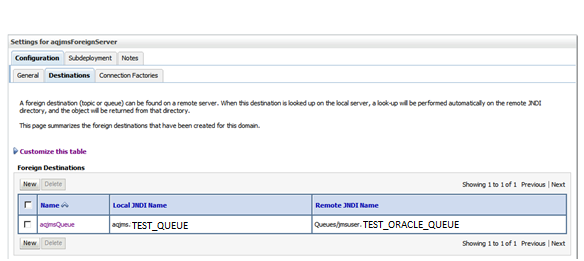
Under the JMS Foreign server created previously create queue destination ‘aqjmsQueue’.
The remote JNDI name must be ‘Queues/jmsuser.TEST_ORACLE_QUEUE’.
The local JNDI name must be ‘aqjms.TEST_QUEUE’.

6. Read message from JMS Queue using MDB


The above JMS queue is created under foreign JMS server and to read the messages from the JMS queue we can create an MDB on the queue.

MDB Sample Code: ReadMessageFromQueue.java
/* Author  : Alok M
Created : 23 Oct 2013
Purpose : Read message from JMS queue*/
package com.test.read;

import javax.ejb.ActivationConfigProperty;

import javax.ejb.MessageDriven;
import javax.jms.JMSException;
import javax.jms.Message;
import javax.jms.MessageListener;
import javax.jms.TextMessage;
import weblogic.javaee.MessageDestinationConfiguration;
/**
 * Message-Driven Bean implementation class for: ReadMessageFromQueue
 * 
 */
@MessageDriven(name = "com.test.read.ReadMessageFromQueue", activationConfig 
= { @ActivationConfigProperty(propertyName = "destinationType", propertyValue 
= "javax.jms.Queue")}, mappedName = "aqjms.TEST_QUEUE")
@MessageDestinationConfiguration(connectionFactoryJNDIName = "aqjms.TEST_CF")

public class ReadMessageFromQueue implements MessageListener {

/**
* @see MessageListener#onMessage(Message)
*/
public void onMessage(Message msg) {
System.out.println("### onMessage on ReadMessageFromQueue :::::::::::::::::::::::");
if (msg instanceof TextMessage) {
TextMessage bm = (TextMessage) msg;
try {
System.out.println("JMS message received on ReadMessageFromQueue " + bm.getText());
}
catch (Exception e) {
System.out.println("JMS message received with Exception on ReadMessageFromQueue ");
}
        } else {
System.out.println("Incorrect JMS message type posted.");
}
}
}
 

7. Now test the above functionality with a sample code below

Using below anonymous block above integration can be tested. It sends a message at Oracle AQ which in turn will be transferred to JMS queue and MDB deployed on JMS queue could listen the queue and retrieve the message which can be used for further processing and logic. The below block can be run from XYZ schema as it already has all the privileges. Apart from that you can also customize business logic in XYZ schema to any extent.


file: anonymous plsql block

Declare

in_queue_name VARCHAR2(100):='JMSUSER.TEST_ORACLE_QUEUE';
message_type VARCHAR2(100):='AQ$_JMS_TEXT_MESSAGE';
error_code NUMBER;
error_text VARCHAR2(200);
v_xml CLOB='put a clob type here';

-- Author  : Alok M

-- Created : 23 Oct 2013
-- Purpose : utility block to send a meesage on Oracle AQ

BEGIN


    JMSUSER.PKGINTFAQJMSSENDER.sendJMSMessage(error_code,
                                         error_text,
                                         in_queue_name,
                                         message_type,
                                         v_xml) ;                                         
END;

As now the Oracle AQ and JMS Queue are connected one should be able to read
the above message on JMS Queue using MDB deployed as an application on weblogic server.

Hope above helps in integrating database Oracle AQ and weblogic JMS queue, please leave your feedback or query.

Wednesday, April 22, 2015

MetaSolv DD tasks not completed by Background Processor

In MetaSolv M6 we know that DD tasks assigned to system work queue are completed by Background Processor.

Background Processor consists of three applications that are distributed between a remote server and the system administrator's workstation. The individual applications are:

Job Master (JMASTER.EXE)
Job Worker or (JWKR.EXE)
Job Manager or (JMANAGER.EXE)

The Background Processor also includes a job queue, which is a table in the MetaSolv Solution database. DD task is a system task which is associated with job(query task table for DD task and check job_id column) the job goes into the job queue database table. Job Master checks the queue periodically. When it finds a job, Job Master initiates a Job Worker and gives it the ID of the job to be processed. Job Manager acts as a window on the job queue that lets you manipulate the queue.

I have observed from experience that sometimes DD tasks are not completing. There may be following reasons for such system task like DD are not completing.

1. Background Processor is not running.
2. Background Processor is running but still DD is not completing.

Before investigating understand below
1. DD task is associated with a job.
2. The job is completed by running jWorker.
3. To invoke jWorker , jMaster(needs jManager to be configured) needs to be up and  running.
4. In some cases(network issues, system on which Background Processor is configured is  down etc) there are issues with jWorker gets stuck or jMaster is not able to invoke them.  Also sometimes even jWorker is running and picking up the jobs but could not complete it  and which moves job status to any of  ('NOR', 'EXE', 'ERR', 'COM') statuses.

In order to fix the issue execute below queries. Below queries will help only when Background Processor is running but not able to pick or complete the jobs because of which DD task doesn't complete.

1    To Update all stuck DD tasks in M6

update job_queue jq
set jq.job_scheduled_date   = sysdate,
jq.job_start_date       = sysdate,
jq.job_queue_status     = 'REA',
jq.job_percent_change   = '0',
jq.job_percent_complete = '0'
where jq.job_id in (select t.job_id
from job_queue jq, task t
where jq.job_queue_status in ('NOR', 'EXE', 'ERR', 'COM')
and t.job_id = jq.job_id
and t.task_status = 'Ready'
and t.task_type = 'DD');        

2   To Update stuck DD task for a specific Order in M6

update job_queue jq
set jq.job_scheduled_date   = sysdate,
jq.job_start_date       = sysdate,
jq.job_queue_status     = 'REA',
jq.job_percent_change   = '0',
jq.job_percent_complete = '0'
where jq.job_id in (select t.job_id
from job_queue jq, task t
where jq.job_queue_status in ('NOR', 'EXE', 'ERR', 'COM')
and t.job_id = jq.job_id
and t.task_status = 'Ready'
and t.task_type = 'DD'
and t.document_number=give your document number);


Also look into job_error table for the job_id as mentioned above to ensure there is no validation failure for the DD task.

Hope above helps in your issues related to stuck DD tasks. Please leave your feedback or query.

MetaSolv Weblogic Server/Datasource's monitoring and email notification through python scripts on cron tab

This is sometimes a common requirement to monitor the MetaSolv application servers(weblogic server instances) and datasources which are created at time of MetaSolv installation and other custom datasources to optimize the connection pool size. 

If your development/production WebLogic domain consists of multiple number (eg. 1 to 100 or 200 or so on) of managed servers then, it is difficult to see all server’s state and datasource's state at once. Weblogic Administration console is unable to show all the servers in the domain on a single page. Navigating in between also a time eating process so the monitoring through script will save lot of time and manual effort. 


The architecture of weblogic server differs from project to project. In my case I have 2 domains.


1. DOMAIN1

2. DOMAIN2


and each domain has an admin , a loadbalancer server and 4 managed server like DOMAIN1 has below


1. admin

2. loadBalancer
3. srvr_1.1(managed server) on unix box 1
4. srvr_1.2(managed server) on unix box 1
5. srvr_2.1(managed server) on unix box 2
6. srvr_2.2(managed server) on unix box 2

Similarly DOMAIN2 has the same configuration.


So now I am going to explain you how I am able to put an eye on server and datasource's properties and their state.


I will summarize it in below STEPs and later provide details for each STEP.


STEP 1. Monitoring of weblogic server instances and datasources through  ServerMonitor.py.

STEP 2. Ensure if SMTP is enabled on unix box.
STEP 3. Send email notification script MailServerState.py.
STEP 4. Encapsulate above scripts in a shell script ServerMonitoring.sh.
STEP 5. Put ServerMonitoring.sh on cron tab in unix box.


Now see the details in each STEP.


STEP 1. 


Create a python script to monitor all the servers in a weblogic domain. In the below script I am passing 4 parameters while calling it. Below parameters can be provided from a property file.

i)   User name for Admin server console

ii)  Password for Admin server console 
iii) URL Admin server
iv)  Name of the Domain

The o/p of the file is written in file status.log (/opt/app/Scripts/JMS/status.log) which we can use while sending email notification.


To get the status and other properties of all servers and the datasources in each server in the domain can be obtained with the following steps

1. Connect to the Admin Server
2. Navigate to the domain runtime MBean hierarchy by entering the domainRuntime command domainRuntime().
3. Navigate to ServerRuntimes to fetch the server list.
4. ServerRuntimeMBean provides methods for retrieving runtime information about a server instance.
5. Pass the serverlist to reportDomainHealth() method which iterate the loop and get the state and other mbeans(other run time mbeans like JVMRuntime, ThreadPoolRuntime) of each admin/managed server to provide monitoring properties for each server.
6. Come back to main method and pass the serverlist to reportDataSourceHealth().
7. All the datasource properties can be fetched from ServerRuntimes-->JDBCServiceRuntime-->JDBCDataSourceRuntimeMBeans mbean hieracrhy.
8. In below script it will only display the datasource details for all such datasource which are not running. In case all are working fine it will simply display "All the Datasources in instance are running fine."
9. Comeback to main method and finally disconnect.


file:ServerMonitor.py

# Purpose: To collect server and datasource statistics and save it to a log file

# Author: Alok Mishra

from java.util import Date

import os
adminUser=sys.argv[1]
print adminUser
adminPassword=sys.argv[2]
print adminPassword
adminURL=sys.argv[3]
print adminURL
server=sys.argv[4]
print server

def reportDomainHealth(serverList):

 cmd = "echo 
\================================================================================================================================================================================================ 
>>/opt/app/Scripts/JMS/status.log"
 os.system(cmd)
 cmd = "echo \"%25s %10s %15s %10s %10s %20s %10s %10s %50s" % ("Server","Threads","HoggingThreads", "IdleThreads", "QueueLength", "ThroughPut" ,"Heap_Free","State","HealthState ")+"\" 
>>/opt/app/Scripts/JMS/status.log"
 os.system(cmd)
 cmd = "echo ------------------------------------------------------------------------------------------------------------------------------------------------------------------------------------------- 
>>/opt/app/Scripts/JMS/status.log"
 os.system(cmd)
 for i in range(len(serverList)):
  if serverList[i] != 'dr--':
   server_st=get('ServerRuntimes/' + serverList[i] + '/HealthState')
   server_state=get('ServerRuntimes/' + serverList[i] + '/State')
              server_tc=get('ServerRuntimes/' + serverList[i] + '/ThreadPoolRuntime/ThreadPoolRuntime/ExecuteThreadTotalCount')
              server_hog=get('ServerRuntimes/' + serverList[i] + '/ThreadPoolRuntime/ThreadPoolRuntime/HoggingThreadCount')
              server_itc=get('ServerRuntimes/' + serverList[i] + '/ThreadPoolRuntime/ThreadPoolRuntime/ExecuteThreadIdleCount')
          server_ql=get('ServerRuntimes/' + serverList[i] + '/ThreadPoolRuntime/ThreadPoolRuntime/QueueLength')
   server_thru=get('ServerRuntimes/' + serverList[i] + '/ThreadPoolRuntime/ThreadPoolRuntime/Throughput')
   server_hpfp=get('ServerRuntimes/' + serverList[i] + '/JVMRuntime/' + serverList[i] + '/HeapFreePercent')
   cmd ="echo \"%25s %10s %15s %10s %10s %20s %10s %10s %80s" % (serverList[i],str(server_tc),str(server_hog),str(server_itc),str(server_ql),str(server_thru),str
(server_hpfp)+'%',str(server_state),str(server_st))+"\" >>/opt/app/Scripts/JMS/status.log"
   os.system(cmd)
     cmd = "echo 
\================================================================================================================================================================================================ 
>>/opt/app/Scripts/JMS/status.log"
     os.system(cmd)

def reportDataSourceHealth(serverList):

 for i in range(len(serverList)):
  if serverList[i] != 'dr--':
   cmd = "echo \"\t\t\t\t\t\t\t\t\tDataSource Monitoring Details on server:"+serverList[i]+" @ " + today.toString() + " \n\n"+ "\" >>/opt/app/Scripts/JMS/status.log"
   os.system(cmd)
   check="false"   
   dataSourceList=ls('ServerRuntimes/' + serverList[i] +'/JDBCServiceRuntime/' + serverList[i] + '/JDBCDataSourceRuntimeMBeans');
   dataSourceList=dataSourceList.split()  
   for j in range(len(dataSourceList)):
    if dataSourceList[j] != 'dr--':
     ds_name=get('ServerRuntimes/' + serverList[i] + '/JDBCServiceRuntime/' + serverList[i] + '/JDBCDataSourceRuntimeMBeans/'+dataSourceList[j]+'/Name')
     ds_state=get('ServerRuntimes/' + serverList[i] + '/JDBCServiceRuntime/' + serverList[i] + '/JDBCDataSourceRuntimeMBeans/'+dataSourceList[j]+'/State')
     ds_capacity=get('ServerRuntimes/' + serverList[i] + '/JDBCServiceRuntime/' + serverList[i] + '/JDBCDataSourceRuntimeMBeans/'+dataSourceList
[j]+'/CurrCapacityHighCount')
     ds_accc=get('ServerRuntimes/' + serverList[i] + '/JDBCServiceRuntime/' + serverList[i] + '/JDBCDataSourceRuntimeMBeans/'+dataSourceList
[j]+'/ActiveConnectionsCurrentCount')
     ds_achc=get('ServerRuntimes/' + serverList[i] + '/JDBCServiceRuntime/' + serverList[i] + '/JDBCDataSourceRuntimeMBeans/'+dataSourceList
[j]+'/ActiveConnectionsHighCount')
     ds_wshc=get('ServerRuntimes/' + serverList[i] + '/JDBCServiceRuntime/' + serverList[i] + '/JDBCDataSourceRuntimeMBeans/'+dataSourceList
[j]+'/WaitSecondsHighCount')
     ds_wfccc=get('ServerRuntimes/' + serverList[i] + '/JDBCServiceRuntime/' + serverList[i] + '/JDBCDataSourceRuntimeMBeans/'+dataSourceList
[j]+'/WaitingForConnectionCurrentCount')
     if (str(ds_state)!="Running"):
      if (check!="true"):
       cmd = "echo \"%25s %15s %20s %30s %20s %20s %25s" %("Name", "State", "Capacity", "ActiveConnectionsCurrentCount", 
"ActiveConnectionHighCOunt", "WaitSecondsHighCount", "WaitingForConnectionCurrentCount") +"\">>/opt/app/Scripts/JMS/status.log"
       os.system(cmd)
       check="true"
      cmd = "echo \"%25s %15s %20s %30s %20s %20s %25s" %(str(ds_name), str(ds_state), str(ds_capacity), str(ds_accc), str(ds_achc), str(ds_wshc), str
(ds_wfccc)) +"\">>/opt/app/Scripts/JMS/status.log"
      os.system(cmd)
   if(check=="false"):
    cmd = "echo \"All the Datasources in instance are running fine."+ "\" >>/opt/app/Scripts/JMS/status.log"
    os.system(cmd)
   
 cmd = "echo 
\================================================================================================================================================================================================ 
>>/opt/app/Scripts/JMS/status.log"
 os.system(cmd)

today=Date()

if __name__== "main": 
 cmd = "echo \"\t\t\t\t\t\t\t\t\t"+server+" Server Monitoring Details: @ " + today.toString() + " \n\n"+ "\" >>/opt/app/Scripts/JMS/status.log"
 os.system(cmd)
 connect(adminUser,adminPassword,adminURL)
     domainRuntime()
     serverList=ls('ServerRuntimes');
     serverList=serverList.split()
 reportDomainHealth(serverList)
 reportDataSourceHealth(serverList)
 disconnect()


The o/p of script should look as below.


STEP 2. 


Confirm if your email service (SMTP) is working fine.


Run below command and verify the o/p


1. Generally port 25 is reserved for SMTP and to check if port 25 is reserved for SMTP and SMTP is enabled run below command.


telnet localhost 25


if SMTP is enabled you should get below response


Trying 127.0.0.1...
Connected to localhost.
Escape character is '^]'.


Else you will get below


if SMTP is disabled please go to step 2 and further steps.


2. If SMTP is not enabled run below command


svcadm enable /network/smtp


3. To confirm if SMTP service is running run below comand


svcs -a | grep smtp


4. From command 3 if you get below response 

online         11:04:28 svc:/network/smtp:sendmail

Then your SMTP is enabled


5. Try running below command and you should get email.


echo "something" | mailx -s "hello" -r "abc@xyz.com"--(enter your email if here)


So now by now you know that email service is working on your machine.


STEP 3. 


Create a python script which will send the status.log file attaching in an email with some generic message to notify the team. But before that ensure that SMTP service is configured on your unix box(STEP 2).

Here in the following script you can replace the 'receiver' and 'To' address value given as  abc@xyz.com with mailing address of your supporting MetaSolv monitoring team list by semicolon separation. 


You can also modify below script according to your requirement. If your requirement is to send email only in case of server state is SHUTDOWN or UNKNOWN in such case you can get the server state in below script(refer from above script) and put conditions here. But my requirement is to send email with irrespective of server state after every certain amount of time.


1 thing I want to highlight here I had problems with base64 import so I print the classpath after import of smtplib and check which jython-modules.jar from classpath location it is being taken. As the base64.py in your jython-modules.jar may not have method encodestring. So please ensure it and use method mentioned in your base64.py. 


Below code is quite self explanatory so in case you have issues understanding it , please leave comment.


file:MailServerState.py

#!/usr/bin/python

# Purpose: Send email for server status
# Author: Alok Mishra
import smtplib
import base64
import time
Date = time.ctime(time.time())
filepath = "/opt/app/Scripts/JMS/status.log"
filename= "status.log"

# Read a file and encode it into base64 format

fo = open(filepath, "rb")
filecontent = fo.read()
encodedcontent = base64.encodestring(filecontent)  # base64
sender = 'MetaSolvAdministrator'
reciever = 'abc@xyz.com'
marker = "AUNIQUEMARKER"
body ="""
Hi All, \n\nPlease find the monitoring details for all MetaSolv domains as attached.\n\n
Regards\nThis is an automated email notification. \nPlease do not reply. Contact Application Support Team."""
# Define the main headers.
part1 = """From: MetaSolvAdministrator
To: abc@xyz.com
Subject: WLS status for all M6 Domains of PROD Environment @ %s
MIME-Version: 1.0
Content-Type: multipart/mixed; boundary=%s
--%s
""" % (Date,marker, marker)

# Define the message action

part2 = """Content-Type: text/plain
Content-Transfer-Encoding:8bit
%s
--%s
""" % (body,marker)

# Define the attachment section

part3 = """Content-Type: multipart/mixed; name=\"%s\"
Content-Transfer-Encoding:base64
Content-Disposition: attachment; filename=%s
%s
--%s--
""" %(filename, filename, encodedcontent, marker)
message = part1 + part2 + part3

try:

   smtpObj = smtplib.SMTP('localhost')
   smtpObj.sendmail(sender, reciever, message)
   print "Successfully sent email"
except Exception:

   print "Error: unable to send email"


STEP 4.  


Automate every process mentioned above using a shell script.

to Automate the above process I wrote a schell script which will run both the python files and provide the necessary parameters from property file.


Script will do below.


1. Calls the SetWLSEnv.sh to set the enviornment to execute python files.

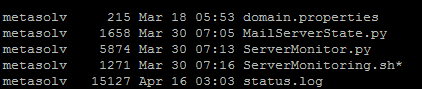
2. Read the domain.property file.
3. Call the python scripts.


 file: ServerMonitoring.sh

# Purpose: To call python scripts for servermonitoring for all the servers

# Author: Alok Mishra
#! /bin/sh
WL_HOME="/opt/app/mss/bea/wlserver_10.3"
# set up class path
. "${WL_HOME}/server/bin/setWLSEnv.sh"
. /opt/app/Scripts/JMS/domain.properties

echo $username

echo $password
echo $DOMAIN1AdminURL
echo $DOMAIN2AdminURL

cat /dev/null > /opt/app/mssnas/m6config/Scripts/JMS/status.log

java weblogic.WLST /opt/app/Scripts/JMS/ServerMonitor.py $username $password $DOMAIN1AdminURL DOMAIN1
java weblogic.WLST /opt/app/Scripts/JMS/ServerMonitor.py $username $password $DOMAIN2ADMINURL DOMAIN2


Also have a look at domain.property file.

provide user/password and other URLs as per your configurations. 


username=weblogic
password=weblogic
DOMAIN1AdminURL=t3://adminserverURLfor domain1:adminserverPort for domain1
DOMAIN2AdminURL=t3://adminserverURLfor domain1:adminserverPort for domain2


You can save the files as per you convenience but in my case all the files are put together.


STEP 5. 


The Final step is to put the shell script ServerMonitoring.sh on cron job in unix box so that out email can regularly be sent to desired recipients.

to do that do below


1. To open a VI style editor.

crontab -e
2. Write below 
0 0,4,8,12,16,20 * * *  /opt/app/Scripts/JMS/ServerMonitoring.sh
3. Save and exit the editor.

Here completes the whole activity of monitoring weblogic servers and datasources. Now the mentioned email addresses will start receiving the email notifications with attachment status.log in their email after every 4 hours starting 00:00 AM in night which means 6 emails/per day.


Hope above helps in your server monitoring tasks, please leave your feedback or query.


Create JMS System Module Resources(distributed queue/ error queue/ quota / error quota and relationship between them) using WLST on Weblogic clustered server enviornment.

Server Architecture : 

Suppose we have a custered weblogic server setup which has 2 unix boxes and on each box 2 managed servers have been set up.

A Custom_cluster has been created which has 4 managed servers as below

1. srvr_1.1(on unix box 1)
2. srvr_1.2(on unix box 1)
3. srvr_2.1(on unix box 2)
4. srvr_2.2(on unix box 2)


Refer the below picture to understand the architecture.


I already have below 4 JMS servers each corresponding to 1 managed server

1. JMSServer_auto_1 on managed server srvr_1.1
2. JMSServer_auto_2 on managed server srvr_1.2
3. JMSServer_auto_3 on managed server srvr_2.1
4. JMSServer_auto_4 on managed server srvr_2.2

Assume that we have above configuration ready with us.

Agenda:


I have summarized the agenda for the post in below points.

1. Create JMS Module ‘custom-jms’.

2. Create Subdeployments.

Subdeploy_srvr_1.1 --> JMS Server JMSServer_auto_1
Subdeploy_srvr_1.2 --> JMS Server JMSServer_auto_2
Subdeploy_srvr_2.1 --> JMS Server JMSServer_auto_3
Subdeploy_srvr_2.2 --> JMS Server JMSServer_auto_4

3. Create Distributed Queue.

ex: Custom.queue

4. Create 4 Member Queues of Distributed Queue.

ex:

Custom.queue_auto_1 --> Subdeployment Subdeploy_srvr_1.1
Custom.queue_auto_2 --> Subdeployment Subdeploy_srvr_1.2
Custom.queue_auto_3 --> Subdeployment Subdeploy_srvr_2.1
Custom.queue_auto_4 --> Subdeployment Subdeploy_srvr_2.2

5. Create 4 Error Queues for each Member Queue.

ex:

Custom.queue_auto_1_error --> Subdeployment Subdeploy_srvr_1.1
Custom.queue_auto_2_error --> Subdeployment Subdeploy_srvr_1.2
Custom.queue_auto_3_error --> Subdeployment Subdeploy_srvr_2.1
Custom.queue_auto_4_error --> Subdeployment Subdeploy_srvr_2.2

6. Associate each Error Queue with it's respective Member Queue.

ex:

Custom.queue_auto_1_error --> Member Queue Custom.queue_auto_1

7. Create Quotas for each Member Queue.
ex:

Custom.queue_auto_1.Quota --> Subdeployment Subdeploy_srvr_1.1
Custom.queue_auto_2.Quota --> Subdeployment Subdeploy_srvr_1.2
Custom.queue_auto_3.Quota --> Subdeployment Subdeploy_srvr_2.1
Custom.queue_auto_4.Quota --> Subdeployment Subdeploy_srvr_2.2

8. Associated each Quota with it's respective Member Queue.

ex:

Custom.queue_auto_1.Quota --> Member Queue Custom.queue_auto_1


7. Create Quotas for each Error Queue.

ex:

Custom.queue_auto_1_error.Quota --> Subdeployment Subdeploy_srvr_1.1
Custom.queue_auto_2_error.Quota --> Subdeployment Subdeploy_srvr_1.2
Custom.queue_auto_3_error.Quota --> Subdeployment Subdeploy_srvr_2.1
Custom.queue_auto_4_error.Quota --> Subdeployment Subdeploy_srvr_2.2

8. Associated each Quota with it's respective Error Queue.

ex:

Custom.queue_auto_1_error.Quota --> Error Queue Custom.queue_auto_1_error


All the above configuration can be visualized through below diagram.


Implementation:

To achieve above agenda we will write below scripts.

1. createJMSModule_Subdployment.py : it will create JMS Module/ sub deployment which will point to respective JMS server.
2. createQueue_Quota.py : It will create distributed queue, member queues, error queue for each member queue, quotas for member queues, quotas for error queues.
3. createJMSObjects.sh : It will call the both the python scripts.
4. createJMS.sh : It will call createQueue.sh by passing it required parameter.
5. property file : contains details

I will explain now one by one about each file mentioned above. Create all the above files at a common location.

createJMSModule_Subdployment.py


1. The python script accepts parameters for user, password, url for admin console and domain name.
2. The 'custom-jms' module will be targeted to cluster named as domain name+'_cluster'(domain name will be prefixed to _cluster). One may use a cluster name as per one's requirement.
3. In the below script we kept subdeployment name as hard-coded but one can accept the name of subdeployment as a parameter to the script. In my case Subdeploy_srvr_1.1 will target JMSServer_auto_1 and similarly others.
4. All the resources like JMS member queues,quotas etc will be targetted to subdeployment which in turn will target to JMS server on a managed server.


Code:
# Purpose: To create JMS Module and SubDeployment
# Author: Alok Mishra

import sys

adminConsole_url=sys.argv[1]
print adminConsole_url
adminConsole_user=sys.argv[2]
print adminConsole_user
adminConsole_pwd=sys.argv[3]
print adminConsole_pwd
domain=sys.argv[4]
print domain
target='com.bea:Name='+domain+'_cluster,Type=Cluster'
print target

connect(adminConsole_user, adminConsole_pwd, adminConsole_url)

edit()
startEdit()
#==============================================================================
# Build JMS Module
# target preferable cluster, single-server DEV domain use server
#==============================================================================

cd('/')

cmo.createJMSSystemResource('custom-jms', 'custom-jms.xml')
cd('/SystemResources/custom-jms')
set('Targets',jarray.array([ObjectName(target)], ObjectName))

#==============================================================================

# Build JMS Subdeployment
#==============================================================================

cd('/SystemResources/custom-jms')

cmo.createSubDeployment('Subdeploy_srvr_1.1')
cd('/SystemResources/custom-jms/SubDeployments/Subdeploy_srvr_1.1')
set('Targets',jarray.array([ObjectName('com.bea:Name=JMSServer_auto_1,Type=JMSServer')], ObjectName))

cd('/SystemResources/custom-jms')

cmo.createSubDeployment('Subdeploy_srvr_1.2')
cd('/SystemResources/custom-jms/SubDeployments/Subdeploy_srvr_1.2')
set('Targets',jarray.array([ObjectName('com.bea:Name=JMSServer_auto_2,Type=JMSServer')], ObjectName))

cd('/SystemResources/custom-jms')

cmo.createSubDeployment('Subdeploy_srvr_2.1')
cd('/SystemResources/custom-jms/SubDeployments/Subdeploy_srvr_2.1')
set('Targets',jarray.array([ObjectName('com.bea:Name=JMSServer_auto_3,Type=JMSServer')], ObjectName))

cd('/SystemResources/custom-jms')

cmo.createSubDeployment('Subdeploy_srvr_2.2')
cd('/SystemResources/custom-jms/SubDeployments/Subdeploy_srvr_2.2')
set('Targets',jarray.array([ObjectName('com.bea:Name=JMSServer_auto_4,Type=JMSServer')], ObjectName))

#==============================================================================

# Finalize
#==============================================================================

save()

activate()
disconnect()

#==============================================================================

# End
#==============================================================================

createQueue_Quota.py


1. The python script accepts parameters for user, password, url for admin console and distributed queue name.
2. To create member queues distributed queue name will be appended with _auto_number.
3. The number will be taken between 1 to 4 where 1 would be reffered for srvr_1.1 and similarly 2 would point to 1.2 and 3 would point to 2.1 and 4 would point to 2.2.
4. Once the member queue name is decided it's respective error queue, quota and error quota names can be genrated as mentioned in script.
5. Rest script is self explanatory.

Code:
# Purpose: To create JMS Queue, Error Queue, Quota, Error Quota and their relationship
# Author: Alok Mishra
import sys
queue=sys.argv[1]
print queue
adminConsole_url=sys.argv[2]
print adminConsole_url
adminConsole_user=sys.argv[3]
print adminConsole_user
adminConsole_pwd=sys.argv[4]
print adminConsole_pwd
connect(adminConsole_user,adminConsole_pwd,adminConsole_url)
edit()
startEdit()

#=================================================================================================================

# Build Distributed queue, Member Queues, Error Member Queues, Quotas for Member Queues and Error Member Queues
#=================================================================================================================
#==========================================================================
# Create Distributed Queue
#==========================================================================
startEdit()
cd('/JMSSystemResources/custom-jms/JMSResource/custom-jms')
cmo.createDistributedQueue(queue)
cd('/JMSSystemResources/custom-jms/JMSResource/custom-jms/DistributedQueues/'+queue)
cmo.setJNDIName(queue)
#==========================================================================
# For loop for 6 Member Queues under a Distributed Queue 
#==========================================================================
for num in range(1,7):  
  memberQueue="%s_auto_%d"%(queue,num)
  errorMemberQueue="%s_error"%memberQueue
  memberQuota="%s.Quota"%memberQueue
  errorMemberQuota="%s.Quota"%errorMemberQueue
  print memberQueue
  print errorMemberQueue 
  print memberQuota
  print errorMemberQuota
#==========================================================================  
  # Create Member Queue
#==========================================================================  
  cd('/JMSSystemResources/custom-jms/JMSResource/custom-jms')
  cmo.createQueue(memberQueue)
  cd('/JMSSystemResources/custom-jms/JMSResource/custom-jms/Queues/'+memberQueue)
  cmo.setJNDIName(memberQueue)
  if num==1:
   cmo.setSubDeploymentName('Subdeploy_srvr_1.1')
  elif num==2:
   cmo.setSubDeploymentName('Subdeploy_srvr_1.2')
  elif num==3:
   cmo.setSubDeploymentName('Subdeploy_srvr_2.1')
  elif num==4:
   cmo.setSubDeploymentName('Subdeploy_srvr_2.2')

#==========================================================================  

  # Create Error Member Queue
#==========================================================================  
  cd('/JMSSystemResources/custom-jms/JMSResource/custom-jms')
  cmo.createQueue(errorMemberQueue)
  cd('/JMSSystemResources/custom-jms/JMSResource/custom-jms/Queues/'+errorMemberQueue)
  cmo.setJNDIName(errorMemberQueue)
  if num==1:
   cmo.setSubDeploymentName('Subdeploy_srvr_1.1')
  elif num==2:
   cmo.setSubDeploymentName('Subdeploy_srvr_1.2')
  elif num==3:
   cmo.setSubDeploymentName('Subdeploy_srvr_2.1')
  elif num==4:
   cmo.setSubDeploymentName('Subdeploy_srvr_2.2')

#==========================================================================   

  # Add Member Queues to Distributed Queue
#==========================================================================  
  cd('/JMSSystemResources/custom-jms/JMSResource/custom-jms/DistributedQueues/'+queue)
  cmo.setLoadBalancingPolicy('Round-Robin')
  cmo.createDistributedQueueMember(memberQueue)
#==========================================================================  
  # Create Quota for Member Queue
#==========================================================================  
  cd('/JMSSystemResources/custom-jms/JMSResource/custom-jms')
  cmo.createQuota(memberQuota)
  cd('/JMSSystemResources/custom-jms/JMSResource/custom-jms/Quotas/'+memberQuota)
  cmo.setBytesMaximum(9223372036854775807L)
  cmo.setMessagesMaximum(9223372036854775807L)
  cmo.setPolicy('FIFO')
  cmo.setShared(false)
  
  # Create Quota for Error Member Queue
  cd('/JMSSystemResources/custom-jms/JMSResource/custom-jms')
  cmo.createQuota(errorMemberQuota)
  cd('/JMSSystemResources/custom-jms/JMSResource/custom-jms/Quotas/'+errorMemberQuota)
  cmo.setBytesMaximum(9223372036854775807L)
  cmo.setMessagesMaximum(9223372036854775807L)
  cmo.setPolicy('FIFO')
  cmo.setShared(false)
#==========================================================================
  # Add Quota to Member Queue
#==========================================================================  
  cd('/JMSSystemResources/custom-jms/JMSResource/custom-jms/Queues/'+memberQueue+'/Thresholds/'+memberQueue)
  cmo.setMessagesLow(9223372036854775807L)
  cmo.setMessagesHigh(9223372036854775807L)
  cmo.setBytesHigh(9223372036854775807L)
  cmo.setBytesLow(9223372036854775807L)

  cd('/JMSSystemResources/custom-jms/JMSResource/custom-jms/Queues/'+memberQueue)

  cmo.setMaximumMessageSize(2147483647L)
  cmo.setQuota(getMBean('/JMSSystemResources/custom-jms/JMSResource/custom-jms/Quotas/'+memberQuota))
#==========================================================================  
  # Add Quota to Error Member Queue
#==========================================================================  
  cd('/JMSSystemResources/custom-jms/JMSResource/custom-jms/Queues/'+memberQueue+'/Thresholds/'+memberQueue)
  cmo.setMessagesLow(9223372036854775807L)
  cmo.setMessagesHigh(9223372036854775807L)
  cmo.setBytesHigh(9223372036854775807L)
  cmo.setBytesLow(9223372036854775807L)

  cd('/JMSSystemResources/custom-jms/JMSResource/custom-jms/Queues/'+errorMemberQueue)

  cmo.setMaximumMessageSize(2147483647L)
  cmo.setQuota(getMBean('/JMSSystemResources/custom-jms/JMSResource/custom-jms/Quotas/'+errorMemberQuota))
#==========================================================================
  # Add Error Member Queue to Member Queue
#==========================================================================
  cd('/JMSSystemResources/custom-jms/JMSResource/custom-jms/Queues/'+memberQueue+'/DeliveryFailureParams/'+memberQueue)
  cmo.setRedeliveryLimit(-1)
  cmo.setExpirationPolicy('Discard')

  cd('/JMSSystemResources/custom-jms/JMSResource/custom-jms/Queues/'+memberQueue+'/DeliveryParamsOverrides/'+memberQueue)

  cmo.setRedeliveryDelay(-1)

  cd('/JMSSystemResources/custom-jms/JMSResource/custom-jms/Queues/'+memberQueue+'/DeliveryFailureParams/'+memberQueue)

  cmo.setErrorDestination(getMBean('/JMSSystemResources/custom-jms/JMSResource/custom-jms/Queues/'+errorMemberQueue))

  save()

#==========================================================================
# Finalize
#==========================================================================
   
  
activate()
disconnect()

#================================

# End
#================================

createJMSObjects.sh


1. The shell script will give a call to both the above python scripts with the parameters.

Code:
# Purpose: To call python for creating JMS Queue, Error Queue, Quota, Error Quota and their relationship
# Author: Alok Mishra
#! /bin/sh
java weblogic.WLST /opt/app/mssnas/m6config/Scripts/JMS/createJMSModule_Subdployment.py $adminConsole_url $adminConsole_user $adminConsole_pwd $domain
java weblogic.WLST /opt/app/mssnas/m6config/Scripts/JMS/CreateQueue_Quota.py "Queue_Name" $adminConsole_url $adminConsole_user $adminConsole_pwd $domain


createJMS.sh


1. The script will set the environment.
2. It will read the property file for the parameters.
3. It will call the other shell script and passing the parameters to it.

Code:
# Purpose: To call shell script which inturn will call python to create JMS module, subdeployment, queues and quotas
# Author: Alok Mishra
#! /bin/sh
#DOMAIN_HOME="/opt/app/domains/domain_name"
SCRIPT_HOME="/opt/app/Scripts/JMS"
WL_HOME="/opt/app/bea/wli10gR3MP1/wlserver_10.3"
# set up class path
. "${WL_HOME}/server/bin/setWLSEnv.sh"
. /opt/app/mssnas/m6config/Scripts/JMS/domain.properties
echo $adminConsole_user
echo $adminConsole_pwd
echo $adminConsole_url
echo $domain
. "${SCRIPT_HOME}/createJMSObjects.sh" "${adminConsole_url}" "${adminConsole_user}" "${adminConsole_pwd}" "${domain}"

domain.property


Also have a look at domain.property file.

adminConsole_user=weblogic
adminConsole_pwd=weblogic
adminConsole_url=t3://adminserverURLfor domain:adminserverPort for domain
domain=name of domain


provide user/password and other URLs as per your configurations.Now by simply executing  createJMS.sh all the JMS objects mentioned will be created and login to console and confirm if all the objects are created.

Hope above helps in JMS Objects creation on weblogic server using WLST, please leave your feedback or query.